> ## Documentation Index
> Fetch the complete documentation index at: https://docs.greip.io/llms.txt
> Use this file to discover all available pages before exploring further.
# Webhooks
## Overview
Webhooks are a way for your Greip account to communicate and send notifications to external services or applications in real-time. By adding webhook URLs to your account, you can receive immediate updates and notifications about important events and activities within the Greip API.
Webhooks play a vital role in enhancing the functionality and integration capabilities of Greip. They provide a seamless means to respond to events such as the detection of new Proxy Connection IP Addresses or the identification of fraudulent payments. With webhooks, you can stay informed about critical activities within your account and promptly take appropriate actions.
Webhooks enable you to leverage the power of external systems by receiving event-driven data and updates. By receiving notifications through webhooks, you can streamline your workflows, trigger automated responses, and gain real-time insights into the fraudulent activities detected by Greip. This integration helps you enhance your fraud prevention measures, safeguard your systems, and maintain a secure online environment for your business and customers.
## How to Add New Webhooks to Your Account
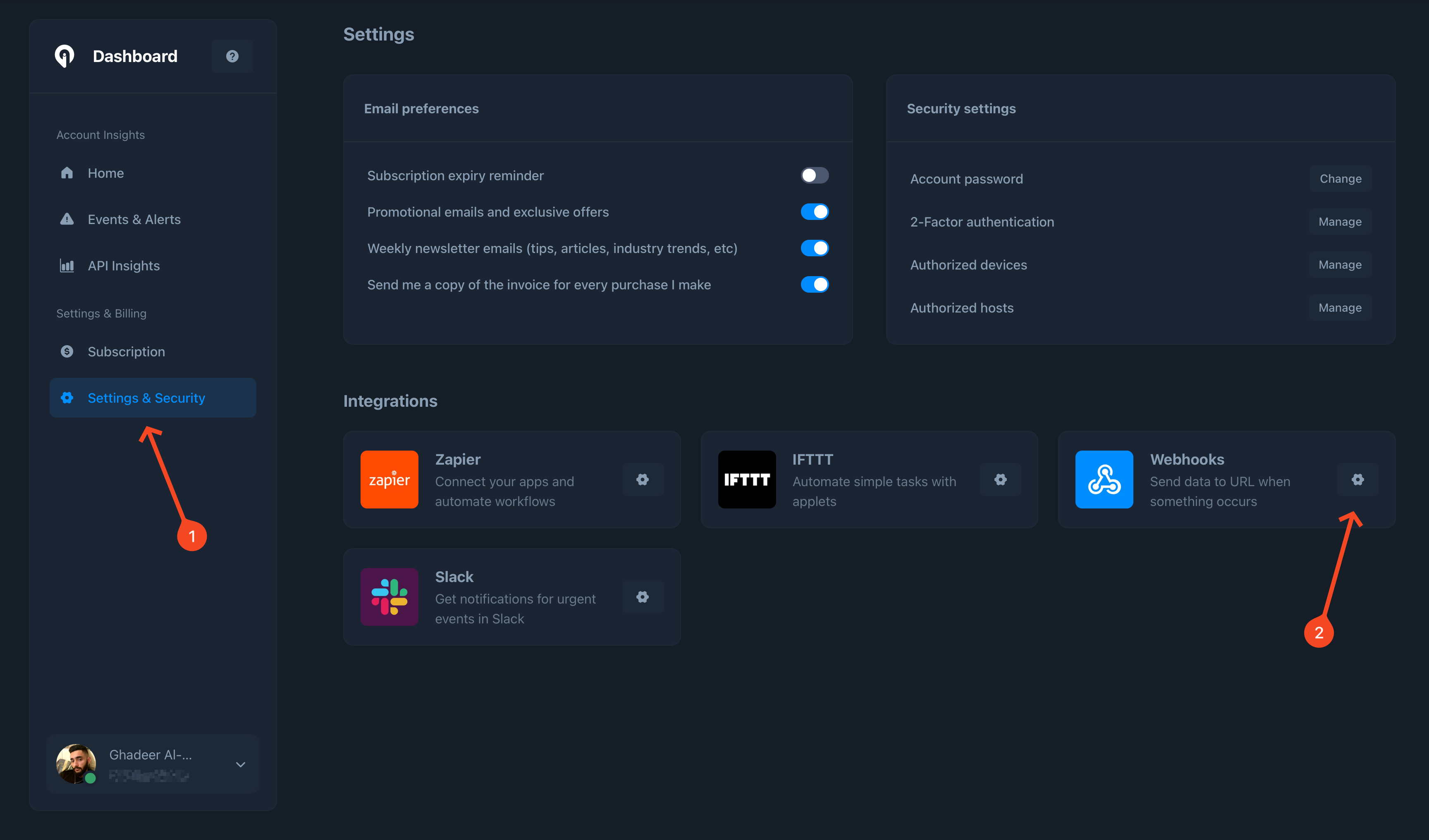
Adding new webhooks to your Greip account is a straightforward process. Follow these steps to integrate webhooks into your account and start receiving notifications:
Go to the [settings](https://dashboard.greip.io/settings) of your account
dashboard
Under the 'Integrations' section, Locate the 'Webhooks' service then click
on the configuration icon
Click the 'Add webhook' button to add a new webhook to receive notifications
to
 **IMPORTANT NOTES**
* Creating webhooks is only available for accounts with paid subscriptions, and there's a limit for each subscription, please visit our [pricing](https://greip.io/pricing) page for more information.
* You have the ability to add Webhook URLs that are already operating in production mode. It is important to ensure that these URLs return an HTTP Code 200 upon access. This signifies that the URL is functioning correctly.
## Webhook events
Below, you will find sample requests for each event you may receive:
**Method: POST**
Request headers
```
Accept: application/json
Accept-Charset: utf-8
Accept-Encoding: gzip, deflate
User-Agent: Greip-Protocol/v1
```
Respones body
```json theme={null}
{
"event": "proxy_detected",
"ip": "1.1.1.1",
"ipType": "IPv4",
"IPNumber": 16843009,
"countryCode": "US",
"countryGeoNameID": 6252001,
"countryName": "United States",
"security": {
"isProxy": false,
"proxyType": null,
"isTor": false,
"isBot": false,
"isRelay": false,
"isHosting": false
}
}
```
**Method: POST**
Request headers
```
Accept: application/json
Accept-Charset: utf-8
Accept-Encoding: gzip, deflate
User-Agent: Greip-Protocol/v1
```
Respones body
```json theme={null}
{
"event": "fraud_payment",
"customer_id": "UID123",
"customer_email": "name@domain.com",
"customer_phone": "0555123456",
"score": 31.666666666666664,
"rules": [
{
"id": "PF10001",
"description": "High purchase rate, according to `customer_ip`."
},
{
"id": "PF10002",
"description": "High purchase rate, according to `customer_id`."
}
],
"rulesChecked": 6,
"rulesDetected": 2
}
```
**Method: POST**
Request headers
```
Accept: application/json
Accept-Charset: utf-8
Accept-Encoding: gzip, deflate
User-Agent: Greip-Protocol/v1
```
Respones body
```json theme={null}
{
"event": "profanity",
"text": "**** *****",
"totalBadWords": 2,
"riskScore": 1,
"isSafe": false
}
```
**Method: POST**
Request headers
```
Accept: application/json
Accept-Charset: utf-8
Accept-Encoding: gzip, deflate
User-Agent: Greip-Protocol/v1
```
Respones body
```json theme={null}
{
"event": "spam_email",
"email": "name@domain.com",
"score": 3,
"reason": "Email domain's SPF record is not set properly.",
"isValid": false
}
```
**Method: POST**
Request headers
```
Accept: application/json
Accept-Charset: utf-8
Accept-Encoding: gzip, deflate
User-Agent: Greip-Protocol/v1
```
Respones body
```json theme={null}
{
"event": "spam_phone",
"phone": "0555123456",
"countryCode": "ir",
"carrier": "",
"reason": "Invalid phone number structure.",
"isValid": false
}
```
**IMPORTANT NOTES**
* Creating webhooks is only available for accounts with paid subscriptions, and there's a limit for each subscription, please visit our [pricing](https://greip.io/pricing) page for more information.
* You have the ability to add Webhook URLs that are already operating in production mode. It is important to ensure that these URLs return an HTTP Code 200 upon access. This signifies that the URL is functioning correctly.
## Webhook events
Below, you will find sample requests for each event you may receive:
**Method: POST**
Request headers
```
Accept: application/json
Accept-Charset: utf-8
Accept-Encoding: gzip, deflate
User-Agent: Greip-Protocol/v1
```
Respones body
```json theme={null}
{
"event": "proxy_detected",
"ip": "1.1.1.1",
"ipType": "IPv4",
"IPNumber": 16843009,
"countryCode": "US",
"countryGeoNameID": 6252001,
"countryName": "United States",
"security": {
"isProxy": false,
"proxyType": null,
"isTor": false,
"isBot": false,
"isRelay": false,
"isHosting": false
}
}
```
**Method: POST**
Request headers
```
Accept: application/json
Accept-Charset: utf-8
Accept-Encoding: gzip, deflate
User-Agent: Greip-Protocol/v1
```
Respones body
```json theme={null}
{
"event": "fraud_payment",
"customer_id": "UID123",
"customer_email": "name@domain.com",
"customer_phone": "0555123456",
"score": 31.666666666666664,
"rules": [
{
"id": "PF10001",
"description": "High purchase rate, according to `customer_ip`."
},
{
"id": "PF10002",
"description": "High purchase rate, according to `customer_id`."
}
],
"rulesChecked": 6,
"rulesDetected": 2
}
```
**Method: POST**
Request headers
```
Accept: application/json
Accept-Charset: utf-8
Accept-Encoding: gzip, deflate
User-Agent: Greip-Protocol/v1
```
Respones body
```json theme={null}
{
"event": "profanity",
"text": "**** *****",
"totalBadWords": 2,
"riskScore": 1,
"isSafe": false
}
```
**Method: POST**
Request headers
```
Accept: application/json
Accept-Charset: utf-8
Accept-Encoding: gzip, deflate
User-Agent: Greip-Protocol/v1
```
Respones body
```json theme={null}
{
"event": "spam_email",
"email": "name@domain.com",
"score": 3,
"reason": "Email domain's SPF record is not set properly.",
"isValid": false
}
```
**Method: POST**
Request headers
```
Accept: application/json
Accept-Charset: utf-8
Accept-Encoding: gzip, deflate
User-Agent: Greip-Protocol/v1
```
Respones body
```json theme={null}
{
"event": "spam_phone",
"phone": "0555123456",
"countryCode": "ir",
"carrier": "",
"reason": "Invalid phone number structure.",
"isValid": false
}
```