> ## Documentation Index
> Fetch the complete documentation index at: https://docs.greip.io/llms.txt
> Use this file to discover all available pages before exploring further.
# Integrate Greip with IFTTT
> Integrate Greip with over 6500 apps and services using IFTTT
IFTTT is a free web-based service that allows you to create chains of simple conditional statements, called app connections, which are triggered based on changes that occur within other web services such as Gmail, Facebook, Instagram, and more. Greip's IFTTT integration allows you to create automated workflows that connect Greip with other apps and services.
## Prerequisites
Before you can integrate Greip with IFTTT, you need to have the following:
* A Greip account with an active subscription
* An IFTTT account with the necessary permissions to create applets
## Installation
To install the Greip IFTTT app, follow these steps:
Go to the [Account Settings page](https://dashboard.greip.io/settings) from
the account dashboard.
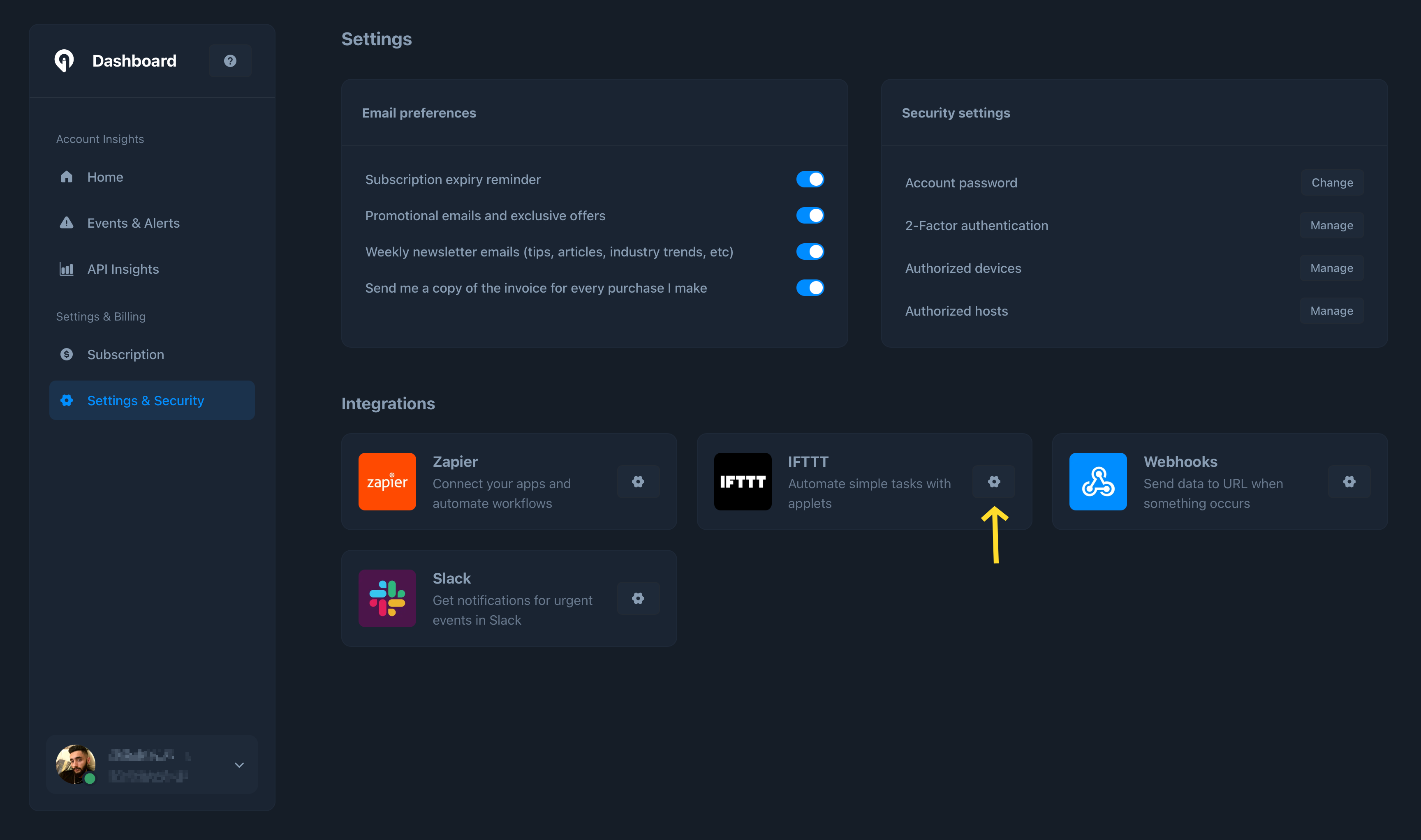
Under the 'Integrations' section, click on the configuration button on the
right side of the "IFTTT" app as shown below:
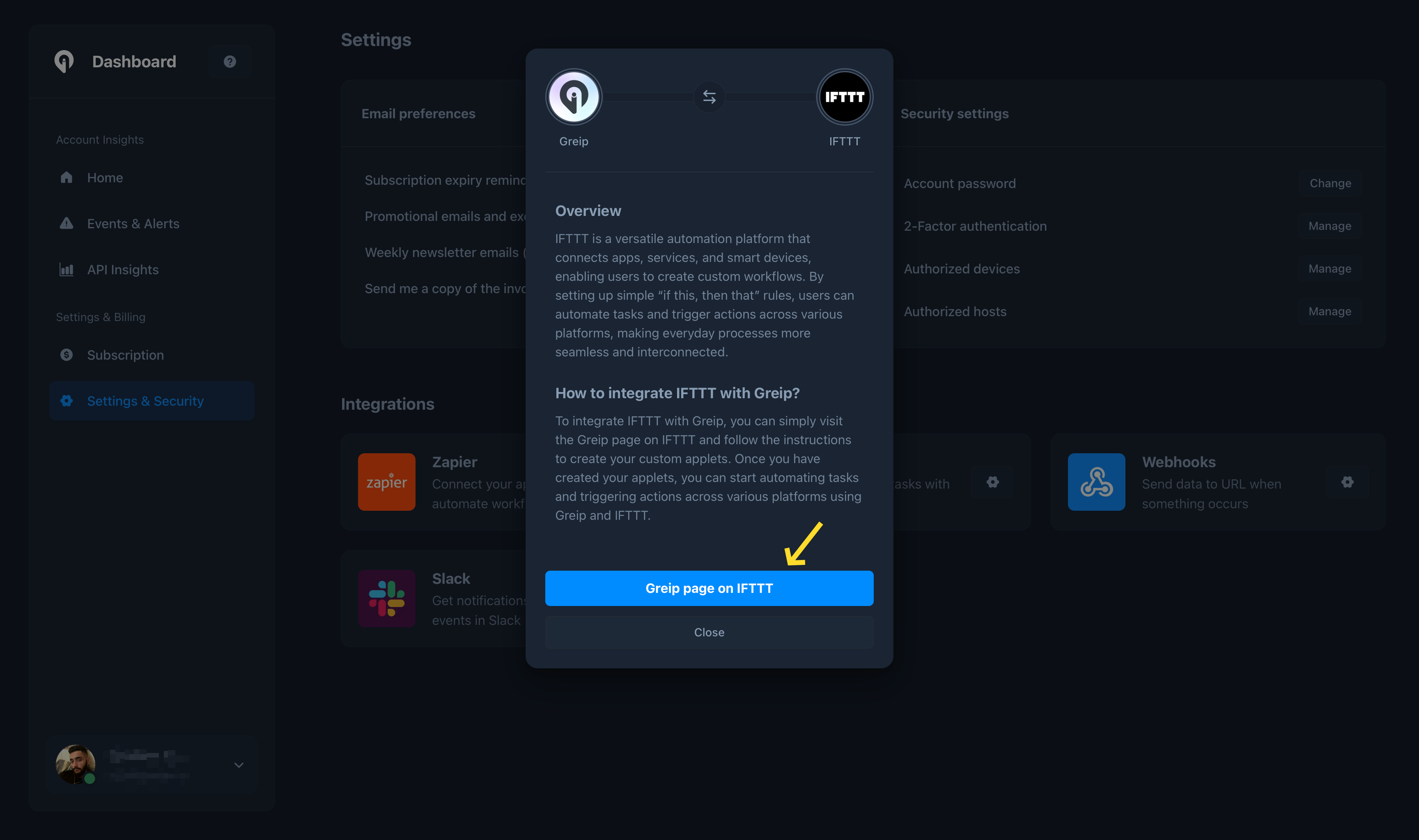
 Click on the 'Greip page on IFTTT' button to start the installation process
as shown below:
Click on the 'Greip page on IFTTT' button to start the installation process
as shown below:
 You will be redirected to the IFTTT authorization page. Click on the
'Connect' button to grant the necessary permissions to the Greip app.
## App Triggers
Greip's IFTTT app supports the following triggers:
* New suspicious IP address is detected
* New profane content is detected
* New high-risk email address is detected
* New high-risk phone number is detected
* New fraudulent payment is detected
* New host is authorised
* Subscription is about to expire
* Your account password is changed
* New coupon is created (Affiliate Program)
## App Queries
Greip's IFTTT app supports the following queries:
* IP lookup
* ASN lookup
* Profanity detection
* Email validation
* Phone number validation
* BIN/IIN validation
## App Actions
Greip's IFTTT app supports the following actions:
* Add new coupon (Affiliate Program)
## Uninstallation
To uninstall the Greip IFTTT app, follow these steps:
Go to the [Account Settings page](https://dashboard.greip.io/settings) from
the account dashboard.
Under the 'Integrations' section, click on the configuration button on the
right side of the "IFTTT" app.
Click on the 'Greip page on IFTTT' button.
Click on the 'Settings' button and then click on the 'Remove' button to
revoke the necessary permissions.
Note that this will remove all Applets and connections for Greip service from your IFTTT account. If you choose to reconnect the service, you'll be able to restore any removed Applets from your IFTTT archive.
You will be redirected to the IFTTT authorization page. Click on the
'Connect' button to grant the necessary permissions to the Greip app.
## App Triggers
Greip's IFTTT app supports the following triggers:
* New suspicious IP address is detected
* New profane content is detected
* New high-risk email address is detected
* New high-risk phone number is detected
* New fraudulent payment is detected
* New host is authorised
* Subscription is about to expire
* Your account password is changed
* New coupon is created (Affiliate Program)
## App Queries
Greip's IFTTT app supports the following queries:
* IP lookup
* ASN lookup
* Profanity detection
* Email validation
* Phone number validation
* BIN/IIN validation
## App Actions
Greip's IFTTT app supports the following actions:
* Add new coupon (Affiliate Program)
## Uninstallation
To uninstall the Greip IFTTT app, follow these steps:
Go to the [Account Settings page](https://dashboard.greip.io/settings) from
the account dashboard.
Under the 'Integrations' section, click on the configuration button on the
right side of the "IFTTT" app.
Click on the 'Greip page on IFTTT' button.
Click on the 'Settings' button and then click on the 'Remove' button to
revoke the necessary permissions.
Note that this will remove all Applets and connections for Greip service from your IFTTT account. If you choose to reconnect the service, you'll be able to restore any removed Applets from your IFTTT archive.